Scan Hero: Scanner App
- 4.5
- Rating
- 10.00M
- Installs
- Free
- Price

 Analysis by App-foxy
I have lost count of how often a simple paper document becomes an annoying task: a form arrives by email, a receipt is needed later, or someone asks for a clear copy of a page while I am away from a printer. Scan Hero: Scanner App is built for that recurring problem. It turns a phone camera into a practical document scanner, and its real value is not that it replaces every office scanner; it is that it removes the delay between finding a paper and sending a usable digital copy.
After using it as a business utility, I see the appeal immediately. I can photograph a page, correct its boundaries, improve its readability, and save a document without looking for a separate scanner. That makes it especially useful for freelancers, students, small-business owners, renters, and anyone who handles paperwork away from a desk. It is a free app in the Business category, developed by Mosaic Srl, with optional in-app purchases ranging from $1.99 to $99.99 per item.
Why this scanner is useful when paperwork appears at the wrong time
The most important test for a mobile scanner is not whether it can capture a page under perfect lighting. Almost any recent phone can take a picture. The better question is whether the app helps me produce something that looks like a document rather than a casual photograph, and whether it does so quickly enough to be worthwhile.
You May Also Like

 AccuWeather: Weather Radar
AccuWeather Review: A Quick, Clear Forecast for Everyday Decisions
For everyday plans, the best forecast is the one you can understand quickly. AccuWeather makes rain timing, radar, and local conditions easy to act on, with a few trade-offs.

 Hill Climb Racing
Why Hill Climb Racing Still Turns Crashes Into One More Run
A tiny car, a bumpy hill and one more upgrade: Hill Climb Racing keeps resurfacing because its simple chaos makes every near-miss feel personal.

 AliExpress - Shopping App
AliExpress Makes Global Shopping Feel Personal, but Shoppers Bear the Risk
AliExpress turns a global marketplace into a pocket-sized discovery engine. Its reach is useful, its shopping loop compelling, and its trade-offs easy to miss.

 Lords Mobile: Kingdom Wars
Lords Mobile Is a Kingdom-Building Routine, Not a Quick Match
A case-by-case verdict on the building, battles, device demands, and social commitments that make Lords Mobile rewarding for some players and exhausting for others.

 PDF Scanner app - TapScanner
TapScanner Makes Paperwork Easier to Capture, Check, and Share
TapScanner makes scanning with a phone feel less like a rescue operation and more like a dependable step in getting work done. Its capture tools are useful, though not flawless.

 Block Blast!
Block Blast! Shows How Much a Puzzle Game Can Leave Out
A quiet grid game shows why puzzle players increasingly value instant clarity, repeatable skill and low-pressure play—and where the genre still needs to catch up.
More From Our News Desk
View All News


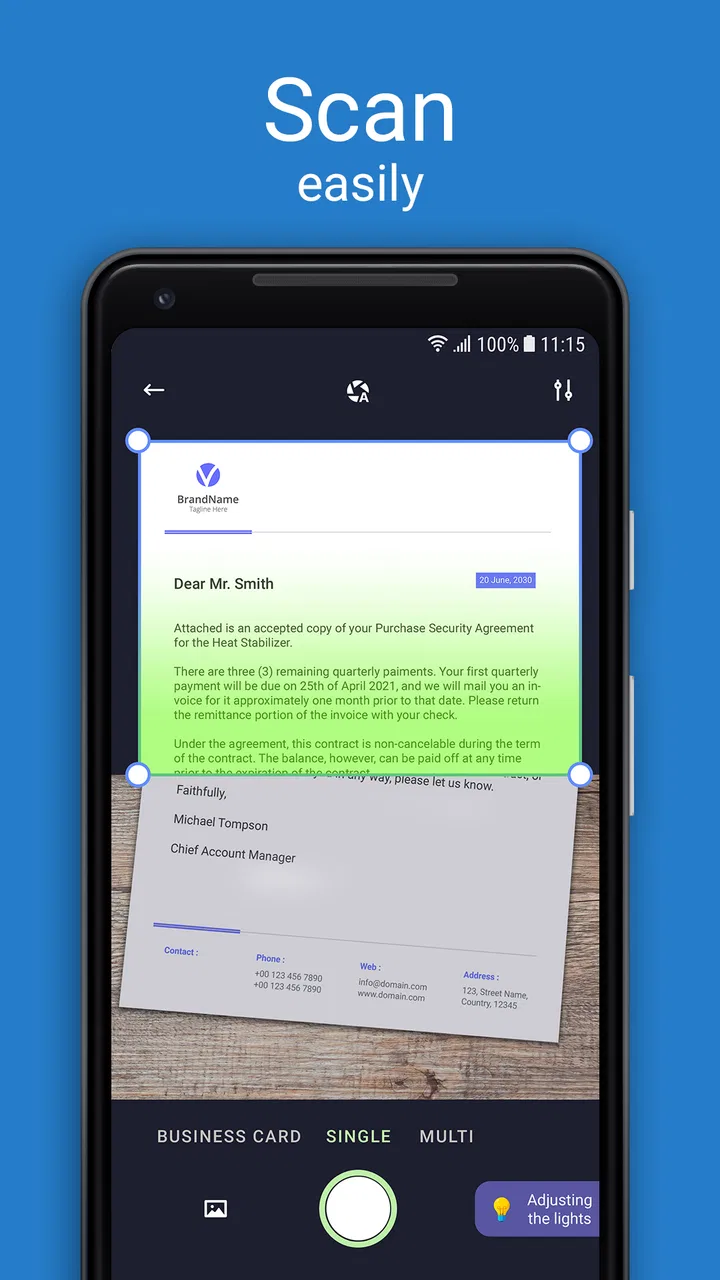
That is where this app earns its place. A normal camera leaves me with perspective problems, shadows, a cluttered background, and a file that may be awkward to share. Scan Hero is designed around the document workflow instead of the camera workflow. I can frame a page, let the app identify its edges, adjust the crop, and continue building a scan rather than managing a gallery full of unrelated pictures.
This difference matters in ordinary situations. If I am sitting at a kitchen table with a contract, the phone may be tilted and the page may not be perfectly flat. If I am photographing a receipt, the paper may be narrow and surrounded by a dark surface. If I am scanning several pages, I want them collected into one coherent document. A dedicated scanner app makes those small corrections part of the process instead of leaving me to fix everything afterward.
The app has also reached a broad audience: its store presence shows an average rating of 4.5 from around 65 thousand ratings and more than 10 million installs. Those figures do not make it automatically right for everyone, but they do fit my impression that it solves a common, practical need rather than serving a very narrow group.
Getting to a useful first scan
The first setup is refreshingly straightforward. I open the scanner, place the document on a reasonably contrasting surface, and keep the phone parallel to the page. That last step is more important than it sounds. Automatic correction can help with perspective, but it cannot fully rescue a page that is heavily folded, partly covered, or photographed from an extreme angle.
For the cleanest result, I use even light and avoid placing my hand across the top edge. Window light works well when it does not create a strong reflection. Glossy receipts and laminated cards need more care because bright spots can hide text. These are not faults unique to Scan Hero, but the app makes the quality of the original capture visible: a good frame requires far less correcting later.
Once the page is detected, I check every corner rather than accepting the automatic crop blindly. This is one of my most useful habits with the app. A scanner can recognize the main rectangle while missing a thin edge, especially when the paper is close in color to the table. Taking a second to inspect the boundaries prevents clipped signatures, dates, or totals.
For multi-page work, I treat the first page as a test. I capture it, inspect the text and margins, then continue only when the lighting and angle are right. This saves time compared with scanning an entire packet and discovering afterward that every page has the same shadow. It is a small workflow improvement, but it is exactly the kind of friction a mobile scanner should reduce.
What I use it for during a normal week
My most realistic use case is a form that needs to be returned quickly. I place the completed pages on a clear surface, capture them in order, check that no handwritten field has been cut off, and prepare the resulting document for sharing. The phone stays in my hand, so I do not need to walk to a printer or wait until I am back at my computer. For a one-off form, that convenience is more valuable than advanced office features I may never use.
Receipts are another good fit. When I need to keep proof of a purchase, a camera photo often includes too much background and makes later reading unpleasant. A scan gives the receipt a more document-like presentation. I still make sure the entire strip is visible, because narrow receipts are easy to crop incorrectly. If a receipt is faded or printed with very small text, I also review the image at full size before considering the job finished.
Students can use the app for handouts, notes, and pages borrowed from a library book, provided the material can legally be copied for the intended purpose. I find it especially practical when several pages belong together. Instead of sending a series of disconnected images, I can keep the pages as one scan and make the recipient’s job easier.
For a small business, the useful scenario is often less dramatic: scanning an invoice at a client’s location, digitizing a signed delivery sheet, or keeping a readable copy of a document before filing the original. The app does not turn a phone into a full records-management system, but it can close the gap between physical paperwork and the next step in a workflow.
Small habits that improve the result
I recommend scanning against a background that contrasts with the page but does not reflect light. A white sheet on a pale desk can make the edges harder to distinguish, while a very dark glossy table may create shadows. Moving the page a few centimeters or changing the angle of the phone is often faster than trying to repair a poor capture.
Another useful habit is to name or organize a document immediately after finishing it, rather than assuming I will remember what it is later. This is particularly important when I scan several unrelated items in one session. “Signed form” or “March receipt” is much more useful than relying on memory after a busy day.
I also avoid treating the scan as proof that the original can be discarded. For tax, legal, medical, or contractual paperwork, I keep the physical document when it matters and use the scan as an accessible working copy unless the responsible organization explicitly accepts the digital version. A clear image is not automatically an officially recognized original.
Finally, I zoom in on small details before sharing. A page can look fine as a thumbnail while a signature, account number, or handwritten note is unreadable. This check takes seconds and prevents the common mistake of sending a document that technically exists but cannot actually be used.
Where it saves more time than the usual alternatives
The obvious alternative is the phone’s regular camera. That works when I only need a visual reminder, but it becomes inefficient when the image must look like a clean page. With the camera, I usually need to crop, rotate, adjust appearance, and sort the result manually. Scan Hero puts those actions closer to the moment of capture, which reduces the number of separate steps.
A physical scanner still has advantages. It is generally better for large batches, consistent office archiving, and pages that need uniform alignment. If I regularly process a thick stack of documents, a desktop scanner with an automatic feeder is the more sensible investment. A phone app is at its best when the job is occasional, mobile, or urgent.
Cloud storage and note-taking apps can also be alternatives, but they solve a slightly different problem. They may be better when the main goal is long-term organization, collaboration, or searching across a large collection. Scan Hero is more focused on getting a paper page into a usable digital form. I would use it as the capture step and then place important files in the storage system I already trust.
That distinction helps set realistic expectations. This is not a complete office archive, a replacement for document management, or a reason to abandon a reliable scanner in a busy workplace. It is a pocket tool for the moment when paper appears and I need a clean copy without extra equipment.
The friction I noticed while using it
The app’s biggest limitation is shared by every camera-based scanner: results depend heavily on the source image. Uneven lighting, curled pages, glare, low contrast, and crowded backgrounds all make the process less reliable. Automatic edge detection is helpful, but I still need to supervise it. Anyone expecting a completely hands-off scan may find that disappointing.
There is also a practical difference between scanning a single page and processing a long document. One page feels quick and natural. A larger batch requires more attention to sequence, focus, page placement, and final review. That is not a deal-breaker, but it changes the app’s ideal role. I would choose it for a handful of pages, not as my first choice for daily high-volume administration.
The free entry point is attractive, but optional purchases are part of the experience, so I would pay attention to what is included before committing to a recurring workflow. For occasional scanning, the free access may be enough for my needs. For someone who wants every convenience or uses the app as a primary business tool, the purchase structure deserves consideration rather than an automatic assumption that every function is free.
Privacy also deserves common sense. Scanned documents can contain addresses, signatures, financial details, or identification information. I avoid scanning sensitive material casually, review where the finished file is being shared, and delete unnecessary copies. That advice applies to any document-scanning service, but it matters more here because the app makes capturing personal paperwork so easy.
Who should use it, and who should choose something else
I would recommend Scan Hero to someone who regularly says, “I need to send this paper right now,” but does not own a scanner. It is a strong match for mobile workers, students, households handling forms, and small teams that need occasional document capture. The app is rated for Everyone, and it runs on devices using Android 7.0 or later, which makes it accessible to many older phones as well as newer ones.
I would be more cautious about recommending it as the central tool for a document-heavy office. If the priority is automatic feeding, strict archival control, advanced text extraction, or a large shared repository, a dedicated scanner and established document-management setup will likely be better. Likewise, if I only need to photograph a whiteboard or save a visual reference, the normal camera may be faster and simpler.
The current version is 1.67.4, and the app’s long presence since its release on May 17, 2018, suggests an established product rather than a brand-new experiment. Still, version information alone does not guarantee that every phone, lighting condition, or workflow will feel identical. I would test it with the types of documents I handle most before making it part of an important routine.
My final judgment after weighing speed against control
Scan Hero succeeds because it targets a repeating inconvenience with a focused workflow. It saves time when I need a readable digital document now, especially when a physical scanner is unavailable. The strongest benefit is not spectacular image processing; it is the reduction of small interruptions: no searching for hardware, no sending a messy camera photo, and less manual cleanup before sharing.
Its weaknesses are equally clear. I still need decent lighting, careful framing, and a final inspection. It is not the right tool for every large archive or every legally sensitive document, and optional purchases mean I should check the available workflow before relying on it heavily.
For me, that balance leads to an easy recommendation for occasional and mobile scanning. I would install it for forms, receipts, notes, and short document batches, while keeping a physical scanner or more specialized system for demanding office work. If your main goal is to turn an awkward piece of paper into a clean, shareable file with the least possible delay, this free Business app is a practical choice. Its real strength is the time it saves at the exact moment paperwork becomes urgent.
FAQs for Scan Hero: Scanner App
01What is Scan Hero: Scanner App used for?
Scan Hero: Scanner App turns your smartphone or tablet into a portable document scanner. You can use it to capture receipts, contracts, notes, forms, business cards, and other paper documents, then save them as digital files. The app generally improves readability through automatic edge detection, perspective correction, cropping, and image enhancement, making documents easier to store, share, or print.
02Does Scan Hero create searchable PDF documents with OCR?
Scan Hero may include optical character recognition, commonly known as OCR, depending on the version, platform, and subscription plan available in your region. OCR can convert text inside a scanned image into editable or searchable content, which is useful for finding words in longer documents. Before downloading, check the current app listing because OCR access, supported languages, and export options can change.
03Is Scan Hero: Scanner App free to download and use?
The application can typically be downloaded without an upfront charge, but some features may require a subscription or in-app purchase. Premium access may include unlimited scanning, advanced export formats, OCR, cloud-related tools, or removal of restrictions and advertisements. Review the pricing screen carefully before starting a trial, especially the renewal terms and cancellation procedure.
04Can I scan and share documents without an internet connection?
Basic scanning is generally designed to work directly on your device, so you can often photograph and process documents even when you are offline. However, certain functions may require an internet connection, including cloud synchronization, online OCR processing, account services, or subscription verification. Exporting a file locally may work offline, while sending it by email or uploading it requires connectivity.
05Are my scanned documents private and secure in Scan Hero?
Your scans may be stored locally on the device unless you choose to synchronize, upload, or share them through another service. Even so, you should review Scan Hero’s privacy policy and the permissions requested by the app before scanning sensitive documents such as identification cards, financial records, or contracts. Use device security, avoid unnecessary cloud uploads, and delete files you no longer need.
Pros
- Scans documents
- receipts
- IDs
- and notes quickly with your phone camera.
- Automatic edge detection helps create clean
- well-cropped digital copies.
- OCR can extract text
- making scanned content easier to edit or search.
- Supports PDF creation and sharing through common apps and cloud services.
- Useful tools include image enhancement
- rotation
- and multi-page scanning.
Cons
- Several advanced features may require a subscription or in-app purchase.
- OCR accuracy can drop with handwriting
- unusual fonts
- or poor lighting.
- The app may request access to your camera and stored files to work properly.
- High-resolution multi-page scans can use considerable storage space.
- Export and sharing options may feel limited without upgrading to premium.

Scan Hero: Scanner App
Gallery